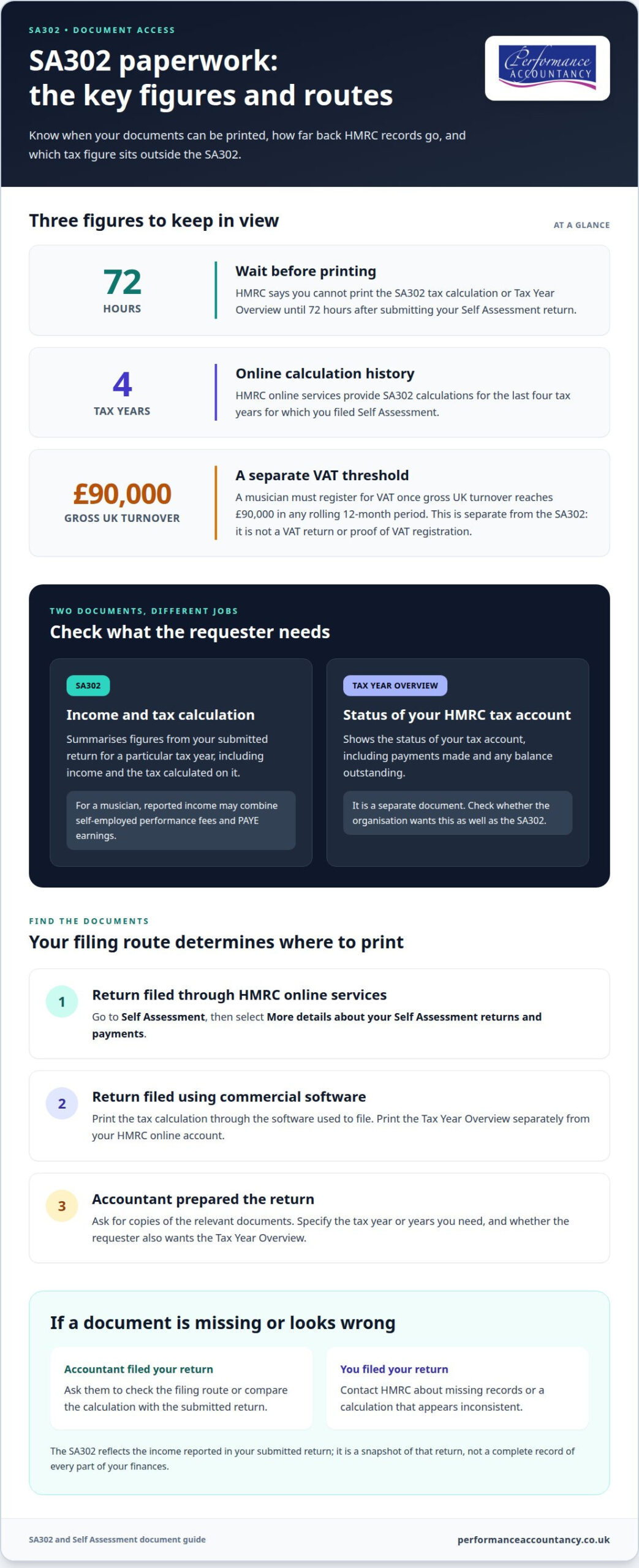
An SA302 can turn a complicated mix of gig fees, PAYE work and other income into a clear tax calculation. You can usually access your tax calculation and Tax Year Overview online after submitting your Self Assessment return. According to HMRC, you can’t print them until 72 hours after submitting your return.
It’s understandable to want the paperwork ready when a lender or another organisation asks for proof of income. The SA302 shows your income and tax calculation for a tax year; the accompanying overview shows the status of your tax account.
This guide explains what each document shows, when it should be available and where to find it. If an accountant prepared your return, you’ll also learn what to ask them for and how their support can keep your tax admin in step with your work as a freelance musician.
Key Takeaways
- The SA302 and Tax Year Overview are separate documents, so find out whether you need both for your income evidence.
- Where you access the tax calculation depends on how your Self Assessment return was filed.
- An accountant who handled your return can usually provide copies of the relevant SA302 documents.
- Your SA302 is based on the figures in your submitted return, including your reported income and tax calculation.
- Specialist accounting support can help make tax paperwork easier to manage alongside the changing rhythm of freelance work.
What is an SA302 form?
An SA302 is HMRC’s tax calculation for a particular tax year. It summarises the figures from your Self Assessment return, including income and the tax calculated on it. For a freelance musician, that income might include self-employed performance fees alongside PAYE earnings from employed work. The document gives a snapshot of the return, not a complete record of every part of your finances.
The SA302 is often requested as evidence of earnings, including during a mortgage application. It is different from a Tax Year Overview, which shows the status of your HMRC tax account, such as payments made and any balance outstanding. If an organisation requests proof of income, check whether it needs both documents; the calculation and account overview serve different purposes.
An accountant can help you locate the right records through HMRC online services. They can explain where the relevant Self Assessment documents sit in your HMRC account and help identify the tax year you need. In the account, the route is ‘Self Assessment’, followed by ‘More details about your Self Assessment returns and payments’. Your accountant can guide you through that route without confusing the SA302 with the separate overview.
If your accountant filed your return using commercial software, the filing route matters: the software is used to print the tax calculation, while the Tax Year Overview can be printed from your HMRC online account. An accountant who handled the return can usually provide copies of the relevant SA302 documents. Tell them which tax year or years you need and whether the request asks for the overview too.
If the documents aren’t visible, an accountant can help you work out whether you’re looking in the correct account or using the correct filing route. If you still can’t access your SA302 or Tax Year Overview, you can contact HMRC for help. Your accountant can help you explain which records you need and what access problem you’re facing.
Musicians also need to keep the tax calculation in perspective: it relates to Self Assessment income tax, not every tax obligation connected with a music business. According to HM Revenue & Customs, a musician must register for VAT once gross UK turnover reaches £90,000 in any rolling 12-month period. The SA302 itself isn’t a VAT return or a record of VAT registration.
If your SA302 is missing, incorrect or doesn’t match your tax return, ask the accountant who filed it to compare the calculation with the submitted return. If you filed yourself, contact HMRC about missing records or a calculation that appears inconsistent.
Knowing whether you need the SA302, the Tax Year Overview or both makes it easier to give a mortgage lender or other requester the right evidence. An accountant can help you identify the relevant tax-year documents and follow the access route that matches how your return was filed.
Viewing an SA302 after submitting a Self-Assessment tax return
After submitting your return, allow time for HMRC’s systems to make the documents available. According to HM Revenue & Customs, you cannot print your SA302 tax calculation and Tax Year Overview until 72 hours after submitting your tax return. An accountant can help you plan around that wait, especially if a mortgage application or another income check has a deadline.
Once the documents are ready, where you find them depends on how the return was filed. For a return submitted through HMRC online services, your accountant can guide you to the Self Assessment area and the records for returns and payments. If you used commercial software, print the tax calculation through that software. You can access the Tax Year Overview separately through your HMRC online account.
An accountant can also help identify which return and tax year you need. HMRC online services provide SA302 calculations for the last four tax years for which you filed Self Assessment. If an accountant prepared your return, they can usually provide copies of relevant documents. If a record isn’t accessible, you can contact HMRC for help, with your accountant helping you describe the issue clearly.
For musicians, one Self Assessment return can bring together income from different working arrangements. A performer might have PAYE income from an orchestral role and self-employed earnings from private teaching or freelance concerts. Yes, a freelance musician can use an SA302 when they have multiple income sources or PAYE income. The calculation is based on the submitted return, so it reflects the income reported there.
Self-employed musicians may claim expenses incurred wholly for their trade. Examples include instrument purchase or maintenance, studio time, recording equipment, musical software, travel and insurance. These costs can affect the taxable profit reported on your return. An accountant can help organise your income and expense records so your return reflects your work accurately.
Freelance musicians may need to file a Self Assessment tax return each year, and the SA302 follows from a submitted return. Where a musician combines employed and freelance work, an accountant can help distinguish PAYE figures from self-employed income before filing. That gives the tax calculation a clear basis and makes it easier to understand what the resulting document represents.
If you want professional support with a musician’s return, Self-Assessment Tax Returns can help bring the different strands of freelance and employed income into one organised filing process. That support can also make it clearer which records you’ll need when you later request an SA302.
Time needed for an SA302 to become available
The wait starts when HMRC receives your submitted Self Assessment return. HMRC produces an SA302 after the return has been submitted and processed, so submitting the form and seeing the calculation are separate points in the process. According to HM Revenue & Customs, you cannot print the tax calculation and Tax Year Overview until 72 hours after submission. Allow that minimum interval before looking for the documents.
That 72-hour wait is useful when planning around a mortgage application, but it isn’t a promise that every return will be ready at precisely that point. The calculation depends on the submitted return being processed. If it doesn’t appear after the waiting period, check that you’re looking in the right place for your filing method, then contact HMRC if you still can’t access it.
Your filing route affects where the tax calculation appears, not the 72-hour period. A return filed through HMRC online services can be followed up through your HMRC online account. If commercial software was used, use that software to print the calculation. The Tax Year Overview can be accessed separately through the HMRC account, giving you both records for the relevant tax year.
Recent calculations are available for the last four tax years for which you filed Self Assessment. That means the available documents depend on both the years you filed and the years HMRC has processed. An unfiled return won’t produce an SA302 for that tax year. If you need an older calculation, identify the filed year first, then look for its records in the relevant account or software.
For a mortgage application, provide the SA302 and Tax Year Overview together as income evidence. The SA302 contains the tax calculation; the overview verifies the tax account information. Mortgage lenders may ask for one to three years of SA302 forms, so establish which tax years the application requires. An accountant who prepared the return can help locate the matching documents and explain which filing route applies.
A practical way to manage the wait is to work backwards from the date you need to submit evidence. First, confirm that the return for the required tax year has been filed. Then allow at least 72 hours before trying to print the documents. If a lender needs multiple years, repeat that check for each filed return, rather than assuming one calculation covers every year.
If your HMRC online account still doesn’t show the records, an accountant can help work out whether the issue concerns access, the filing software or processing of the return. They can also help you contact HMRC with the relevant tax year and document details. Keep a note of when you applied, which tax years you filed for and how you tried to access the records, so you can plan around the wait.
What an SA302 tax calculation shows
An SA302 sets out the income and tax calculation for a particular tax year. It summarises information from the Self Assessment return submitted to HMRC, rather than providing a full set of accounts. For a freelance musician, it can show the income reported and the tax calculated from the return’s figures. Its purpose is to present the year’s tax position in a document that can be used as evidence of earnings.
The calculation includes reported income, allowances or reliefs, and the Income Tax and National Insurance due. It shows how the figures in your return lead to the calculated tax. For example, an allowance or relief listed on the calculation can affect the taxable income used in the assessment. The document records the result based on your submitted return, but it doesn’t replace the return itself.
A musician’s return may include more than one source of income, such as self-employed freelance earnings and income from employed work. The SA302 brings the reported information together for its tax calculation. It doesn’t provide a separate performance-by-performance breakdown, nor does it explain the commercial arrangements behind each engagement. Those details belong in the records used to prepare the return.
Keep the SA302 distinct from the Tax Year Overview. The SA302 shows income and the tax calculation, while the overview shows the status of the HMRC tax account, including payments made and outstanding balances. If a lender asks for income evidence, these documents provide complementary information: one gives the calculation, and the other relates to the account. A tax calculation from commercial software may also be accepted alongside HMRC records.
Reading the calculation alongside the submitted return can help identify what the document represents. An accountant can explain how reported income, allowances and reliefs feed into the calculated tax, and help investigate a mismatch between the return and the SA302. This matters if a figure seems unfamiliar or if a return included both employed income and freelance earnings. The calculation follows the information submitted to HMRC.
The SA302 is a tax document, not a general measure of a musician’s financial position. It doesn’t describe future bookings, cash flow between gigs or the value of instruments and other business assets. Its figures relate to the tax year shown, so another year’s calculation may give a different picture as income and reliefs change. For a clear income record, retain the return and related documents with the calculation.
For lenders and other organisations, the distinction between tax calculation and account overview helps clarify what each record can evidence. The SA302 supports a view of declared income and calculated tax; the overview adds the account’s payment position. Together, they give a more complete view of the submitted Self Assessment position than either document alone.
Getting an SA302 from an accountant
If you’re working out how to get an SA302 as a freelance musician, start by asking the accountant who prepared your Self Assessment return. An accountant who handled your return can usually provide copies of the relevant SA302 documents. Explain what you need the evidence for, such as a mortgage application, and name the tax year. This gives them a clear starting point for finding the right record and distinguishing it from other Self Assessment paperwork.
Make your request specific. Say whether you need the Tax Year Overview as well as the SA302, and include any deadline given by the organisation requesting evidence. If you need records for several tax years, list each year. The accountant can then identify the relevant returns and provide the corresponding documents they hold.
Where you access the calculation depends on how you filed. If you submitted your return through HMRC online services, your accountant can help you find the relevant Self Assessment records in your HMRC account. If you used commercial software, print the tax calculation from that software. The Tax Year Overview is accessed separately through HMRC online services, so ask for both documents by name.
- Specify the tax year or years you need.
- Say whether you need the SA302, the overview or both.
- Explain whether the records are for a mortgage or another income assessment.
- Include the date by which you need to provide the evidence.
If another accountant prepared the return, establish who filed it and which route was used. The original preparer is usually best placed to provide the matching calculation. If they can’t supply a copy, they can explain how to access the records. HMRC can also help if you have difficulty obtaining your SA302 or Tax Year Overview.
If the calculation seems inconsistent with your return, ask the preparer to compare it with the figures submitted. Identify the specific income, allowance or relief that concerns you. This gives them a clear point to investigate, rather than a general request to review the whole assessment. Keep the return and calculation together as a record of the figures filed and calculated.
For a clear request, you could write: “Please send me the SA302 and Tax Year Overview for the tax year required by my lender. I need to provide them by the date in their request.” If you’re still deciding how to get an SA302 as a freelance musician, include the filing method and year so your accountant can direct you to the relevant records.
If you need support preparing a musician’s return and obtaining its related tax records, get help with your Self Assessment tax return.
Performance Accountancy: Tax returns for Musicians, Opera Singers, actors, ballet dancers and Conductors
Performance Accountancy supports musicians and other performing arts professionals with tax returns, including Self-Assessment Tax Returns. If you need a return prepared or have a mix of freelance and employed income to report, specialist support can help bring the figures together clearly. The submitted return is the basis for the SA302, so accurate reporting matters when you later need tax evidence.
Support is also available for Limited Company Accounts and MTD IT where those services fit your working arrangements. If you’re unsure how your tax return relates to the SA302 you need, an accountant can help clarify the next step and the records involved.
Contact Performance Accountancy to discuss support with your tax return.
Make your next tax step feel manageable
Knowing how to get an SA302 as a freelance musician can also prompt a useful next step: keeping your tax records organised as your working mix changes. Concert fees, teaching income and company activity can each call for careful reporting, so a consistent system makes future tax administration easier to approach.
Performance Accountancy prepares Self-Assessment tax returns and limited company accounts, and provides support with Making Tax Digital for Income Tax. This may suit you if you want help preparing a return or managing the tax work connected with your business structure. Start by identifying which part of your finances you want help organising.
Contact Performance Accountancy for help with your tax return and the records behind it. With the paperwork in order, you can give more attention to the work waiting beyond the admin desk.
Frequently Asked Questions
Can I get an SA302 if I use an accountant?
Yes. If your accountant prepared and filed your Self Assessment return, ask them for the SA302 for the tax year you need. They can usually provide a copy or explain how to access it, depending on the filing method. For example, if you need documents for a mortgage application, specify the tax year and whether the lender also wants a Tax Year Overview. If another accountant filed your return, contact the preparer first.
Do musicians pay tax differently to other self-employed people?
Musicians generally report self-employed income through Self Assessment, under the same system as other sole traders. The type of work affects which income and business expenses go into the return; there isn’t a separate musician tax system. For example, a freelance player may have performance fees, teaching income and allowable costs such as instrument maintenance. If they also have PAYE work, that income may need to be included alongside their freelance figures.
Is an SA302 proof of income?
An SA302 can serve as evidence of income because it shows the figures reported in your Self Assessment return and the resulting tax calculation. A lender or other organisation may request it to assess your earnings, but its own application requirements determine which records it needs. For example, a mortgage application may also ask for a Tax Year Overview or calculations covering other tax years. The SA302 does not show future bookings or expected income.
SA302 vs Tax Year Overview: what’s the difference?
The SA302 presents the income and tax calculation for a filed tax year; the Tax Year Overview concerns your HMRC tax account. The overview can show payments made and outstanding balances, so it adds account information rather than repeating the calculation. If a lender requests both, send the documents together for the same tax year. An accountant can help match each calculation with its corresponding overview, particularly if you have returns for several years.
What is an SA302 tax calculation and what is it used for in the UK?
An SA302 is HMRC’s tax calculation based on a submitted Self Assessment return. It summarises reported income and the tax calculated for the relevant year. In the UK, people commonly use it as evidence of earnings when an organisation assesses their income, including for a mortgage. It is not the tax return itself, nor does it set out every gig, invoice or business transaction behind the return.
How can an accountant help a freelance musician download an SA302 from HMRC online services?
An accountant can help you identify the right tax year and guide you through the relevant Self Assessment area of your HMRC online account. They can also clarify whether the tax calculation needs to be printed through commercial filing software instead. For example, if you’re gathering records for a lender, ask the accountant to identify the matching SA302 and Tax Year Overview. The filing method determines where the calculation is accessed.
How can an accountant request an SA302 from HMRC if you cannot access your online account?
An accountant can help you identify the access problem and explain which tax-year record you need, but the account holder may need to contact HMRC directly about access. Tell your accountant whether you filed through HMRC online services or commercial software, and which return is involved. If the accountant submitted the return, they can usually provide copies of relevant SA302 documents. Keep the exact year and document name ready when asking for help.
Which tax years can HMRC provide an SA302 for?
HMRC online services provide SA302 calculations for the last four tax years for which you have filed a Self Assessment return. The available years therefore depend on your filing history, rather than simply the current calendar year. If you need older records or are unsure which years were filed, ask the accountant who prepared your returns to identify them. For a mortgage application, match the years requested to the calculations available for your filed returns.