

A calm guide to what matters and what YOU actually NEED to do
If Making Tax Digital feels confusing, overwhelming, or like something you’re half-trying not to think about, you’re not alone.
There’s a lot of noise around MTD for Income Tax, a lot of software being promoted as “MTD-ready” and a lot of well-meaning advice that doesn’t always reflect how performers and freelancers actually work in the real world.
I’ve created this page to cut through that noise.
- Not to rush you.
- Not to panic you.
- And definitely not to tell you to sign up to something “just in case”.
This is simply a clear explanation of how I look at MTD software for my clients — and what I can and can’t support when the time comes.
First things first: does this even apply to you?
Before we talk about software, let’s slow things down and get clear on one important point.
Making Tax Digital for Income Tax only applies if you are mandated — and not everyone is.
You are brought into MTD based on your gross income before expenses from self-employment and/or landlord rental income. If your gross income for the 2024/25 tax year is around £50,000, you will be mandated from April 2026.
If that isn’t you, you don’t need to change anything right now.
- You don’t need new software.
- You don’t need to sign up to quarterly reporting.
- And you certainly don’t need to overhaul a system that already works.
I can still work perfectly happily from spreadsheets, bank statements, Xero, 1Tap, QuickBooks Self-Employed (if I must), and a range of other formats.
MTD isn’t optional if you’re mandated — but it isn’t universal, and it isn’t immediate either.
HMRC, and I, will be clear with you when it applies.
So why am I talking about software now?
Because while the mandate date might say 2026 or 2027, the people who find MTD least stressful are the ones who treat it like a rehearsal, not an opening night.
That doesn’t mean signing up formally.
It doesn’t mean submitting quarterly updates early.
And it definitely doesn’t mean rushing into a decision.
It simply means understanding what your options are – calmly, without pressure – so that when the time comes, nothing feels unfamiliar.
Software recommendations have been revised for March 2026 – see diagram below:
How I’ve approached reviewing MTD software
I want to be clear about how I’ve formed these views.
I haven’t sat down and personally tested every piece of software end-to-end. Instead, my review is based on a combination of:
- attending multiple MTD briefings and demonstrations
- conversations with software providers
- discussions with accountants already working on MTD pilots
- and, most importantly, asking: “Would this actually work for my clients?”
That last part matters.
Software that works beautifully for a straightforward sole trader with one income stream often struggles once you introduce agents, multiple payers, foreign income, seasonal work, or a mix of PAYE and self-employment.
And if you’re both a sole trader and a landlord, some tools require multiple subscriptions or entirely separate systems, something that isn’t always obvious from the marketing.
Those realities are reflected in the comparison.
What the comparison table is (and isn’t)
The table below compares a range of software options that are relevant to MTD — from full bookkeeping platforms to lighter record-keeping tools and MTD-specific solutions.
It looks at who each tool is designed for, where it tends to work well, where it can fall down, and how realistic it is for performers to use consistently.
Where relevant, I’ve also noted whether a product can complete a full end-of-year tax return if you self-file. (For my clients, I use separate professional software for year-end filing, as agent access via HMRC is restricted.)
This isn’t about declaring winners or losers. It’s about helping you understand the landscape.

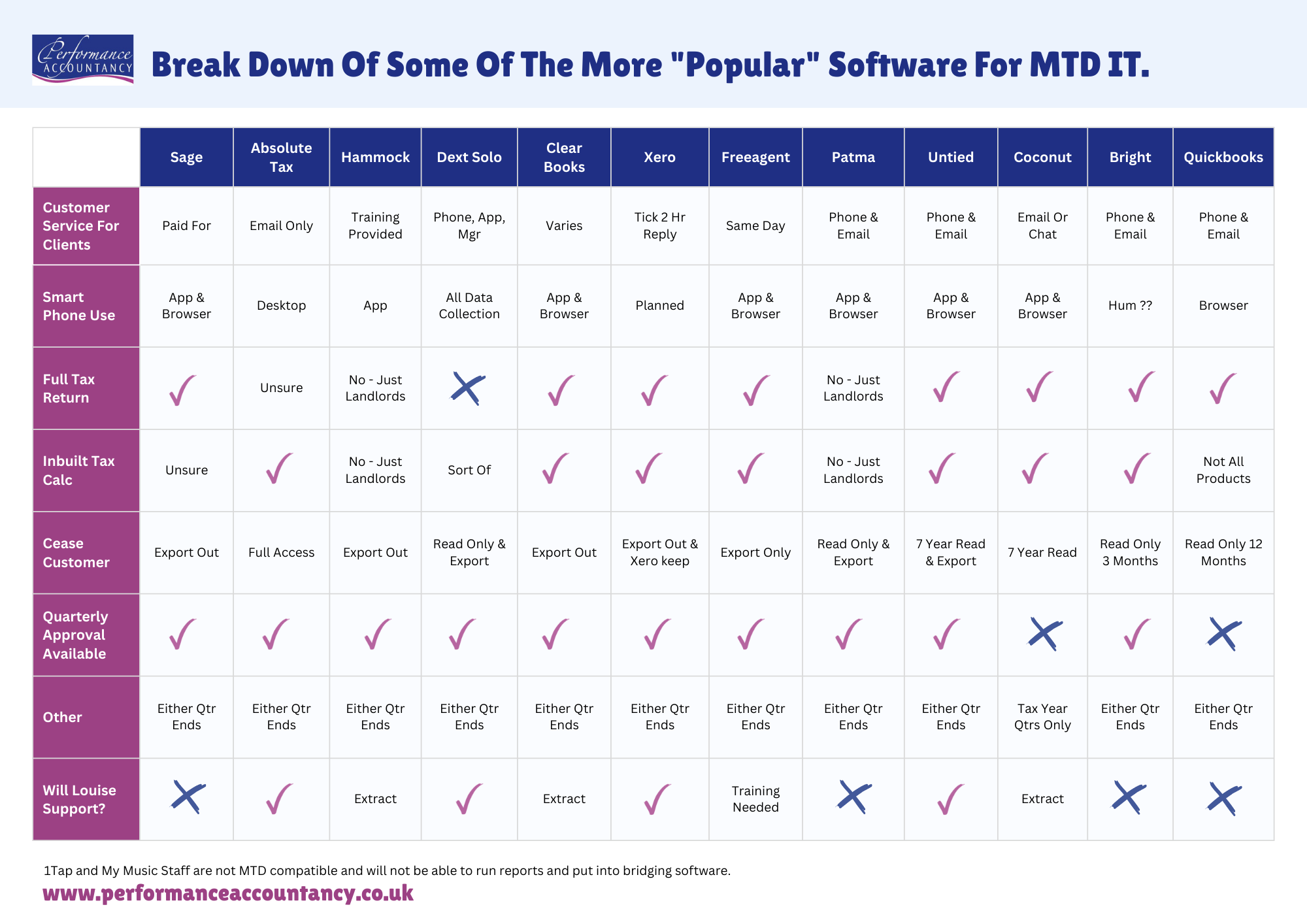
Software recommendations have been revised for March 2026.
The row that REALLY matters
If you only look at one row in the table, make it the final one: whether I will support that software for MTD purposes.
That decision is practical, not judgemental.
If something is marked as “not supported”, it doesn’t mean it’s bad, or that HMRC won’t accept it. It means I can’t build a reliable, low-stress workflow around it for my clients — and I won’t attach my name to submissions unless I’m confident in the process.
What “supported” actually means in practice
When I say I will support a piece of software for TD, I mean that I understand how it behaves in real-world use. I know where clients tend to get stuck, how the reports work, and how the data flows through the system.
Depending on your service level, that support might include help with setup, training, review checks, quarterly submissions, and year-end finalisation.
Some tools will still require additional training on my side — my practice has historically been built around Xero and structured Excel workflows — but I’m clear about what I’m prepared to support properly.
And what “not supported” means
If a product is marked as not supported, it’s usually because the workflow is fragile, the reporting isn’t robust enough, or it creates more manual correction than it saves.
You may still choose to use that software, but it may mean I need data exported in a specific format, moved elsewhere for filing, or handled with additional review — and that can affect fees.
A quick word on QuickBooks
This comes up a lot.
If you’re not mandated into MTD, you can continue using QuickBooks.
If you are mandated, I won’t be able to support QuickBooks as the MTD submission solution — though I can still extract data, work from reports, and complete your tax return.
That decision is based on practical experience, not ideology.
Now, before you do anything…
Please don’t rush into decisions based on a webinar, a marketing email, or a Facebook group where no one has seen your numbers.
Don’t switch systems “just in case”.
Don’t assume quarterly updates replace tax returns.
MTD is a compliance requirement, not a lifestyle choice.
So…what happens next Louise?
If you’re not mandated, nothing needs to change — though you may choose to familiarise yourself slowly.
If you might be mandated, we wait for confirmation unless you’d like to practise early.
And if you are mandated, I will contact you with clear, step-by-step guidance.
When the time comes, we will choose software together — based on what HMRC requires, what actually works, and what I can support confidently.
You don’t need to get this perfect today.
You just need to know you’re not facing it alone.
Software recommendations have been revised for March 2026.